Delta UniForm: One Table, Every Tool
Blogs
Failover Clustering setup in Postgres
November 24, 2025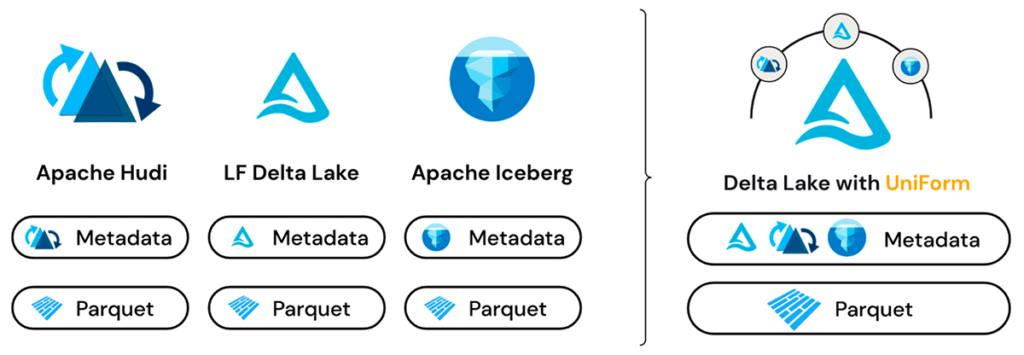
The open lakehouse promise has always been simple store your data once, use it anywhere. Delta UniForm is the closest thing we have to making that promise real.
The Problem Nobody Talks About Enough
If you work with data in the modern cloud stack, you have almost certainly run into this situation.
Your data lives in Databricks as Delta tables. Your data science team loves it. Your pipelines run perfectly. Then another team says they want to run analytics using Trino. Or StarRocks. Or Apache Flink. Suddenly you are looking at two options, both of them painful:
Option A Copy your data into Iceberg format so the other tool can read it. Now you have two copies of the same data, double the storage cost, and a synchronization problem that gets worse every day.
Option B Force everyone onto the same tool. Now you have probably some unhappy engineers.
Neither option is good. Both are surprisingly common.
Delta UniForm exists to make both options unnecessary.
What Is Delta UniForm?
Delta UniForm short for Universal Format is a feature in Databricks that lets a single Delta table be read simultaneously as a Delta Lake table, an Apache Iceberg table, or an Apache Hudi table.
The key insight behind UniForm is simple but powerful: Delta Lake, Apache Iceberg, and Apache Hudi all store their actual data in the same underlying format Apache Parquet files. The difference between these formats is not in the data itself. It is in the metadata layer that sits on top the files that describe the table structure, track changes, and tell readers which Parquet files belong to the current version of the table.
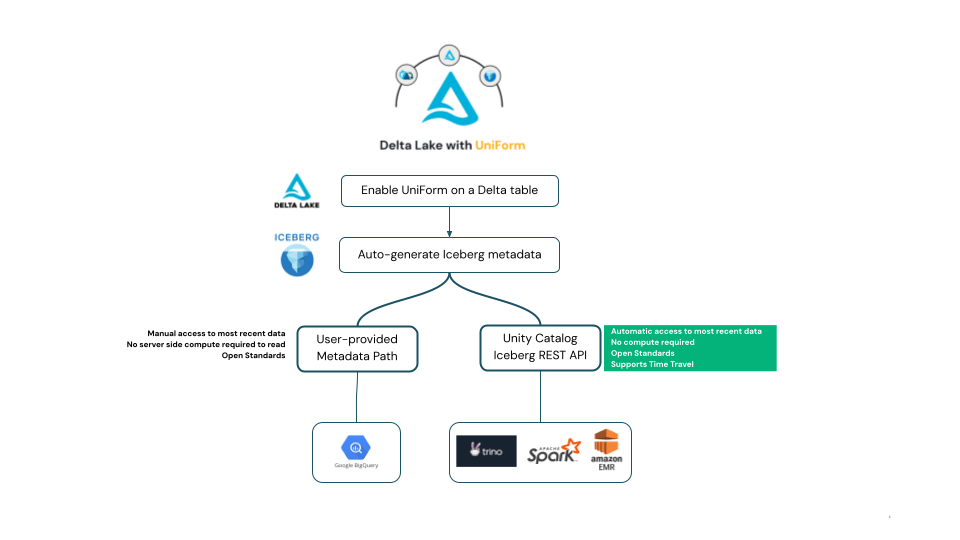
UniForm takes advantage of this. When you write data to a Delta table with UniForm enabled, Databricks automatically generates and maintains Iceberg-compatible metadata alongside the Delta metadata all pointing to the same Parquet files. No data is copied. No separate pipeline runs. The Iceberg metadata is generated automatically on every write.
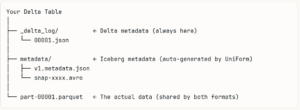
From a Delta reader’s perspective, nothing has changed it is still a Delta table. From an Iceberg reader’s perspective, it is a perfectly valid Iceberg table. Same data files. Two metadata layers. Zero duplication.
How to Enable It
Enabling UniForm takes four table properties set at creation time:
Sparksql
CREATE TABLE my_catalog.my_schema.sales_data (
transaction_id BIGINT,
customer_id INT,
product_name STRING,
sales_amount DECIMAL(18,2),
transaction_date DATE
)
TBLPROPERTIES (
‘delta.enableDeletionVectors’ = ‘false’,
‘delta.enableIcebergCompatV2’ = ‘true’,
‘delta.columnMapping.mode’ = ‘name’,
‘delta.universalFormat.enabledFormats’ = ‘iceberg’
);
That is all you need to do on the Databricks side. From this point, every time you insert or update data in this table, Databricks automatically regenerates the Iceberg metadata in the background. No manual refresh. No separate job. No extra compute cost.
You can verify it worked by running:
Sparksql
DESCRIBE EXTENDED my_schema.sales_data;
Look for the “Metadata location” field under the # Delta Uniform Iceberg section. If you see a path ending in .metadata.json, your table is ready to be read as Iceberg by any external tool.
Closing Thoughts
Delta UniForm is not a flashy feature. It does not add new analytical capabilities or change how you write pipelines. What it does is quietly remove one of the most persistent sources of friction in modern data architecture the format wall that forces you to choose between tools or maintain duplicate data.
Write once to Delta Lake. Let every tool in your ecosystem read it natively. That is a simple idea, and Delta UniForm makes it real.
Coming up next: Now that your Delta tables are UniForm-enabled and readable as Iceberg, the natural next question is how do you actually connect an external tool to them? In the next post, I will walk through a complete step-by-step runbook on how to connect StarRocks to Azure Databricks Unity Catalog.
Bharath Kumar S